



 Pricing your products competitively is vital to winning the Buy Box.
With this in mind, the Buy Box Chaser increases your chances of winning the Buy Box by allowing you to move prices downward to avoid being stuck at an uncompetitive price. In this article, we'll guide you through how to enable and use the Buy Box Chaser.

How the Buy Box Chaser Works
The Buy Box Chaser will only kick in when you are not winning the Buy Box, and will never go below your minimum price.
Once you win the Buy Box or hit your minimum price, the Buy Box Chaser will stop. It will only reprice by the amount and time intervals that you choose when setting it up (see below).
How to set up the Buy Box Chaser
Simply follow the steps below:-
Navigate to your Repricing Rules. You can use the Buy Box Chaser by either creating a new rule or editing an existing one.
-
Once in a rule, ensure you are in the Advanced Rule track.
- Under the Compete Settings section, there is a Buy Box Chaser toggle that you need to switch on to enable the feature.
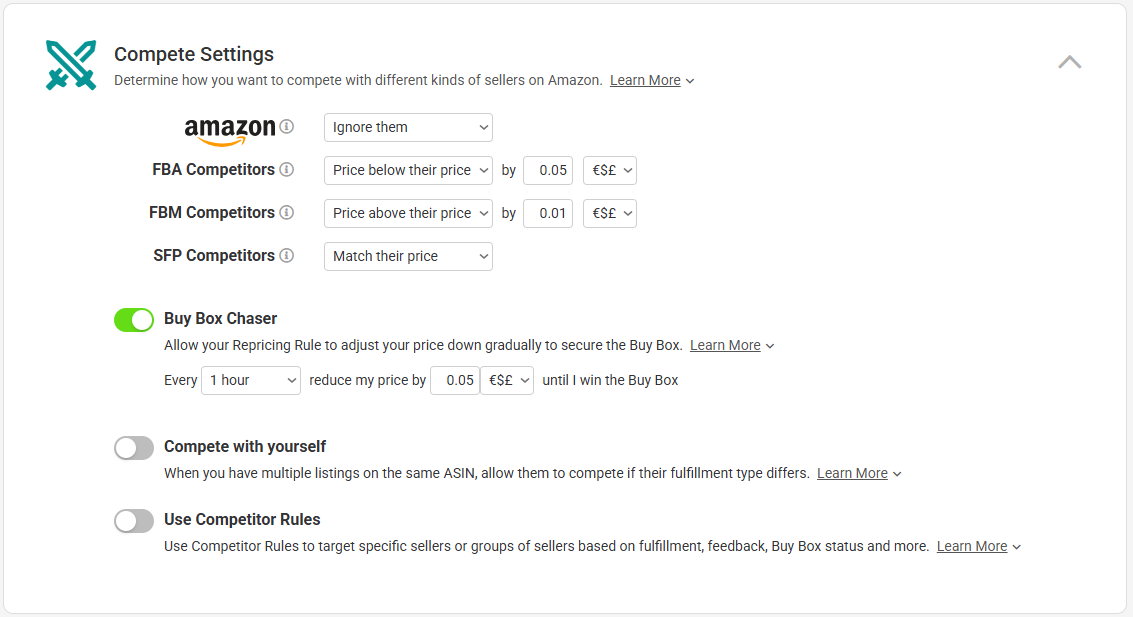
- Once the Buy Box Chaser is enabled, the settings will appear. Here, you need to set how often you want your price to decrease and how much.
Above is an example that allows the Buy Box Chaser to decrease your price by 5c every 30 minutes.
Further Readings
To learn more about the Multichannel Pricing option in Repricer.com, click here.
Interested in finding out more about the Buy Box Optimizer? Click here.